
As part of some work on XPages OpenLog Logger, I’m looking to not only log SSJS errors but also give the facility to push them to an Error control for the relevant component or an Errors control if they are not associated directly to a control.
There have been a couple of challenges around this.
First, I’m aggregating error objects into a LinkedHashSet so there are no exact duplicates – because dynamically computed properties can be calculated during a number of phases of the XPages lifecycle, the same error could be encountered a number of times during a partial refresh. The errors are then logged out to OpenLog by a PhaseListener in the afterPhase() method for the Render Response phase. That’s right at the end of the lifecycle, when we cannot encounter any further errors.
However, if you call FacesContext.getCurrentInstance().addMessage()during that method, rendering has already occurred, so although they’re added to the FacesContext, all Error controls have already been rendered without any errors. So we need to add it earlier.
So I moved my code to the beforePhase() method. But that runs before the Render Response phase, so any errors encountered during the Render Response phase are not written to the FacesContext.
So I leave the writing to OpenLog until the PhaseListener’s afterPhase() method for the Render Response phase. But I moved the code to call FacesContext.getCurrentInstance().addMessage() to run the first time an error gets added to the LinkedHashSet. But I want to tell the user which component the error is for, so I include component.getId().
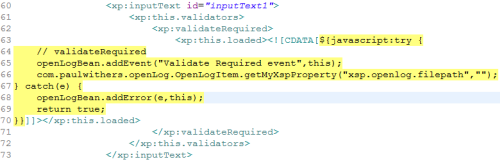
Here things got strange. When FacesContext.getCurrentInstance().addMessage() ran, the component had no id. component.getId() returned null. But OpenLog had the component id. The property that triggered the error was a computed on page load validateRequired validator. The source pane code is below:
Nothing unusual, so it would appear. So I looked at the .java file that gets created. You can probably see why it’s not outputting an id for the component when it hits an error with the validateRequired:
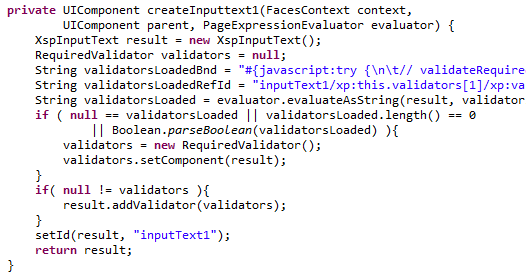
As you can see, the setId method comes after the evaluator.evaluateAsString() call which throws the error. I wondered if perhaps I had added the id to the component on a subsequent save, so perhaps the order in which the properties had been defined caused the problem. No. Invariably, setId() is called last. setUrl method on an Image control is added after setId, but that’s the only one I’ve seen so far.
So almost any loaded property is calculated before an id is added to the control.
I have an idea or two how to work around it, but it’s an interesting point to note.






