One of the key learning points from my session at IBM Connect and Engage last week was around datasources and using viewScope. It was only when I was initially creating the demo application that I learned what is in this blog post, but it drew upon something I was aware of for some time and have mentioned before on this blog.
A little over two years ago I blogged about scoped variables, implicit variables and repeat controls. There I actually hit and diagnosed the exact cause I found again when preparing for my session at IBM Connect this year, but from a different angle. I had confirmed that viewScope does not exist prior to the component tree being loaded, but is only created afterwards. It’s something Jesse Gallagher had already realised, because his controller framework puts the object initially in requestScope and then moves it to viewScope.
So how does this relate to dominoDocument datasources? A few weeks ago there was a question on StackOverflow about problems trying to open a document. Immediately, the stack trace and symptoms corresponded exactly to the scenario from my sample database for IBM Connect. The key lines of the stack trace are:
com.ibm.xsp.application.ViewHandlerExImpl._createViewRoot(Unknown Source)
com.ibm.xsp.application.ViewHandlerExImpl.createViewRoot(Unknown Source)
com.ibm.xsp.application.ViewHandlerExImpl.doCreateView(Unknown Source)
com.ibm.xsp.application.ViewHandlerEx.createView(Unknown Source)
And the cause line:
NotesException: Invalid universal id
The reference to the viewScope variable confirmed my suspicions and the cause (and resolution) is where the dominoDocument datasource is placed. In the sample database for my session there is an XPage called Twin_Pines.xsp. There I set a viewScope variable in the beforePageLoad event, corresponding to the view name to use in the demo. My initial code is (with a deliberate mistake that the documentId should be set to computed on page load (${javascipt:...) and ignoreRequestParams needs to be true on the dominoDocument datasource or the documentId computation will be run but get overridden if anything is in the URL.
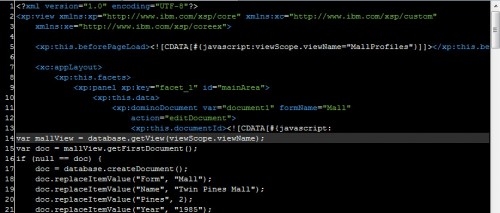
Note particularly the position of the datasource. It is attached to a Panel – datasources can be attached to the XPage, Custom Controls and Panels; and in fact that is the difference between the Panel component and the Div component (the Div component xp:div is not visible by default, but in the Palette Preferences you can set it to be visible).
If you preview the XPage, it works fine.
However, what is interesting is what happens if you then cut and paste the xp:this.data entity and its descendants and move it so it is now a child of the xp:view, the XPage itself. It will now look like this:
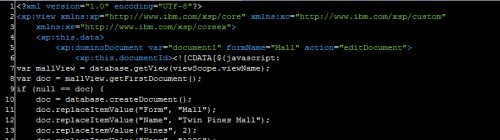
When you preview it, you will get an error message returned to the server console, this:
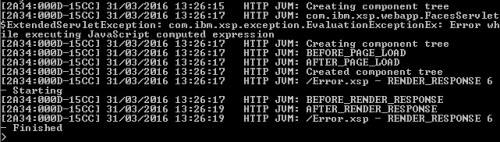
The detailed error message is “Script interpreter error, line=2, col=25: [TypeError] Exception occurred calling method NotesDatabase.getView(null)
null” The detailed stack trace has those same lines from the StackOverflow question:
at com.ibm.xsp.application.ViewHandlerExImpl._createViewRoot(ViewHandlerExImpl.java:521)
at com.ibm.xsp.application.ViewHandlerExImpl.createViewRoot(ViewHandlerExImpl.java:567)
at com.ibm.xsp.application.ViewHandlerExImpl.doCreateView(ViewHandlerExImpl.java:142)
at com.ibm.xsp.application.ViewHandlerEx.createView(ViewHandlerEx.java:90)
That on itself only gets us so far. Looking at the server console, the error happens while the component tree is building and before the beforePageLoad event has created the viewScope variable. So, understandably, it’s null and you can’t get the view corresponding to a null object.
Move it back, look at the server console again, and you’ll see the print statements outputting the ID run after the beforePageLoad event, when viewScope exists, which is why it works. Put it in a custom control and it will work regardless of where the custom control is placed. Presumably this is because in a custom control or a panel, it is attached to something that allows all the properties to be deferred for loading.
Finally, just to explain why the Stack overflow has a different error, the getDocumentByUNID() method throws a specific error whether you pass a null UNID or a UNID that doesn’t exist in the NSF. But the cause – and the resolution – is the same.