
For the first time I’ve got an application that would benefit from Single Copy XPage Design. The challenge is how to develop that in a way that can best be managed via source control and deployed through development, test and live environments. That’s because, unlike design inheritance, Single Copy XPage Design is set in Domino Designer, in the Application Properties, on the XPages tab.
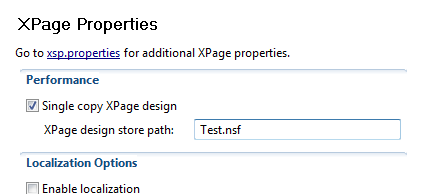
There are two issues here:
- The literal path is stored in the design, so all environments need to have the SCXD database at the same path. That’s not always desirable because different environments may be set up differently.
- It now needs two NSFs as part of source control – one for the XPages design and one for each instance.
Number one can be managed, albeit manually, during migration. For number two, I tested pointing it to itself. So all instances could then share the same design. I thought that was a long-shot, because it might get itself confused and fail, but if it worked it would keep a cleaner source control repository.
The outcome though was significantly worse!
As expected, it threw an Error 500. When I checked the XPages log, it gave the error java.lang.IllegalStateException: NotesContext not initialized for the thread. A quick Google didn’t give a definitive explanation, but the stack trace was pretty conclusive in confirming what I expected – an infinite loop on trying to load the database with the XPages design elements:
at com.ibm.domino.xsp.module.nsf.NotesContext.termThread(NotesContext.java:162)

at com.ibm.domino.xsp.module.nsf.NSFComponentModule.initModule(NSFComponentModule.java:505)

at com.ibm.domino.xsp.module.nsf.NSFService.createNSFModule(NSFService.java:752)

at com.ibm.domino.xsp.module.nsf.NSFService.loadModule(NSFService.java:735)

at com.ibm.domino.xsp.module.nsf.NSFComponentModule.initModule(NSFComponentModule.java:481)

at com.ibm.domino.xsp.module.nsf.NSFService.createNSFModule(NSFService.java:752)

at com.ibm.domino.xsp.module.nsf.NSFService.loadModule(NSFService.java:735)

at com.ibm.domino.xsp.module.nsf.NSFComponentModule.initModule(NSFComponentModule.java:481)

at com.ibm.domino.xsp.module.nsf.NSFService.createNSFModule(NSFService.java:752)

at com.ibm.domino.xsp.module.nsf.NSFService.loadModule(NSFService.java:735)
But when I tried removing the setting in the Application Properties, the error still occurred. Restarting the HTTP task had no effect. Cleaning the database had no effect. Thankfully I had a copy of the design, and refreshing the design solved the problem.
Moving the XPages design elements to a separate database may be a best practice way forward – it keeps a clean design for both the XPage design database and the data database, though increasing the number of databases in the repository. I will just still have to change the SCXD path on each migration.
Addendum
Thanks to Cameron Gregor for sending me the ANT task he mentions in his comments. Here it is:
<target name="deployapp">

<fail unless="buildNumber">buildNumber property must be set</fail>

<bxp:settemplatenames server="TemplateServer" database="Templates\yourapp_${buildNumber}.nsf" mastername="yourapp_${buildNumber}" clearinheritfrom="true">

</bxp:settemplatenames>

<bxp:settemplatenames server="LiveServer" database="scxd\yourapp.nsf" inheritfrom="yourapp_${buildNumber}">

</bxp:settemplatenames>

<bxp:settemplatenames server="LiveServer" database="templates\yourapp.ntf" inheritfrom="yourapp_${buildNumber}">

</bxp:settemplatenames>

<bxp:refreshdbdesign server="LiveServer" database="scxd\yourapp.nsf" templateserver="TemplateServer" />

<bxp:refreshdbdesign server="LiveServer" database="templates\yourapp.ntf" templateserver="TemplateServer" />

<bxp:scxd server="LiveServer" database="scxd\yourapp.nsf" scxdflag="false" scxdpath="" />

<bxp:scxd server="LiveServer" database="templates\yourapp.ntf" scxdflag="true" scxdpath="scxd\yourapp.nsf" />

<bxp:refreshdbdesign server="LiveServer" database="apps\yourappA.nsf" templateserver="LiveServer" />

<bxp:refreshdbdesign server="LiveServer" database="apps\yourappB.nsf" templateserver="LiveServer" />

</target>






Hi Paul,
I have a bit of a solution for this! I don’t have too much time to explain right now but will do soon
https://github.com/camac/BuildXPages
Basically I have a java library that calls notes c api funcitons such as refresh designs, set template names, set scxd settings
I then wrapped this up as ant tasks so I can put them in my build steps you could do the same for maven.
So when I deploy, my script I copy templates and then set up the template names and scxd after replace/refresh
This way I only need the one nsf in source control
Cameron
here is a bit more detail
We are developing a single copy xpage design (scxd) application which is built and deployed by Jenkins (continuous integration server) and the code is hosted on Github.
The application properties in the source code do not specify any SCXD settings or template names, and both the XPages and ‘classic’ design elements are in the same nsf.
For our ‘build’
Jenkins pulls the source code from Github, builds an nsf (BUILTNSF) that has the buildNumber in the file name ‘yourapp_123.nsf’, and moves it to be under the data folder of our development server.
For our ‘deploy’ , in our target environment we have an nsf used for scxd (SCXDNSF), and an ntf used as the template (TEMPLATE) and then all the nsf’s that are the actual live databases.
We set the template name of the BUILTNSF to ‘yourapp_123’, then set the SCXDNSF and the TEMPLATE to inherit from ‘yourapp_123’
Then we refresh the designs of both the SCXDNSF and TEMPLATE.
After this refresh, we clear the scxd path on the SCXDNSF and set the scxd path on the TEMPLATE to point to the SCXDNSF
Then we refresh all the actual live databases from the TEMPLATE (and they will have the correct scxd path)
To do all this programmatically, we use the Build4XPages project I mentioned, it allows us to set template names and inheritance, set scxd path settings, refresh designs by using calls to the Notes C API via Java Native Access (JNA)
These tasks are available via ant tasks, so they can be called from an ant build script. (which is what we do) for example:
buildNumber property must be set
: ( it stripped out my example ant xml