
Over the last few months I’ve been digging further into Watson Assistant (previously Watson Conversation). If you’ve watched my OpenNTF contributions, that’s apparent from the XPages library I put up there which wraps the Watson Developer Cloud Java SDK.
One of the nice things about Watson Assistant is natural language parsing of dates using the @sys-date system entity. But I encountered a rather significant issue:
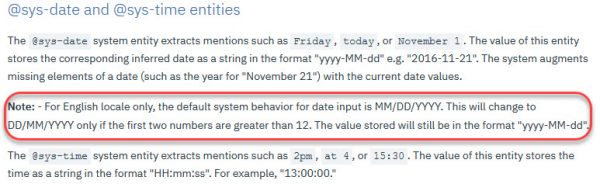
So a date entered as “1/4/18” gets stored as “2018-01-04” – 4th Jan instead of 1st April. Cue much swearing and scratching of head, because there didn’t seem to be an option to change that default system behaviour. I double-checked my URL, and I was in eu-gb data center, so it wasn’t because I was on a US data center. I started down the route of an Entity with a regex to get UK date format, but manipulating that into an actual date while also handling all the various formats entered began to be a huge PITA.
But after some searching I found a way to manipulate the date and get the output I needed from the @sys-date system entity.
     {
       "context": {
         "actualDate": "<? (@sys-date.reformatDateTime('dd') > 12) ? @sys-date : @sys-date.reformatDateTime('yyyy-dd-MM') ?>"
       },
       "output": {}
     }
So this takes the @sys-date and, if the “days” element is greater than 12, we know US manipulation hasn’t happened, it’s exactly what we entered. And because @sys-date is stored in ISO format, we can just continue with that. Otherwise, we take the @sys-date and store it as yyyy-dd-MM, so basically reversing the manipulation. So 1/4/2018 gets manipulated to @sys-date as “2018-01-04” and we reformat it and store it in the context variable as “2018-04-01”.
That’s great, unless the user actually enters “2018-04-01”. In that case, @sys-date just accepts “2018-04-01” and we reformat it and store it in the context variable now as “2018-01-04”. Hmmm.
The solution for that is to add an entity to handle ISO format (I’m assuming anyone entering ISO format will use “2018-04-01”, not “2018-4-1”).
{
    "entity": "iso-date",
    "values": [
        {
            "type": "patterns",
            "value": "iso-date",
            "metadata": null,
            "patterns": [
                "((19|20)?\\d\\d)-(0?[1-9]|[12][0-9]|3[01])-(0?[1-9]|1[012])"
            ]
        }
    ],
    "metadata": null,
"description": null
}
I only have one dialog node getting a date, so I just added a dialog node immediately prior to the one gettng @sys-date, where I checked for @iso-date and just stored the literal value entered by the user in the context variable. So whether it’s entered as 1/4/2018, 1st April, April 1st, 01-04-2018 or 2018-04-01, it gets stored as a value that is always 1st April 2018.






